

Vincere
Connect your Vincere account in about ten minutes, then push candidates Hyreflow finds straight into Vincere and read your jobs, companies and contacts back out.
Hyreflow finds and enriches candidates. Vincere is where your team works with them. Once the two are connected, candidates go straight into Vincere with no copy and paste, and Hyreflow can look up your jobs, companies and contacts while it searches.
Free on Hyreflow. Reading from and writing to Vincere costs 0 credits, on any plan. It runs on your own Vincere account.
Setup at a glance
1 · Message Vincere Support
Ask for three details and give them one link. Copy our ready-made message.
2 · Enter the details
Paste them into the Vincere card on the Integrations page.
3 · Connect
Sign in to Vincere once. Hyreflow keeps you connected.
You don't need a developer. You do need:
- Someone who can message Vincere Support for your company, usually your Vincere admin.
- A Vincere login for whoever clicks Connect. Hyreflow sees the same records that person sees in Vincere.
- A Hyreflow workspace you can sign in to.
Message Vincere Support
Vincere issues the connection details for each company, so the first step is a quick message to them.
Vincere takes support requests only in its in-app chat, not by email: sign in to Vincere, click the
chat button at the bottom right, and paste this message. Change yourcompany to your own Vincere
address first. The Connect Vincere window in Hyreflow has the same message with a Copy button.
Hi Vincere Support,

Please set up API access for our Vincere account
so we can connect it to Hyreflow.

Our Vincere address: yourcompany.vincere.io

Please send us our Tenant Id, Client ID and API Key,
and add this Redirect URL to our account:

https://recruit.hyreflow.ai/api/v2/integrations/vincere/oauth/callback

If we already have API credentials with other
Redirect URLs, please add this one alongside them
rather than replacing them.

Thank you
Their reply includes these lines:
| Vincere sends | Looks like | What to do with it |
|---|---|---|
| Tenant Id | yourcompany.vincere.io | Enter in Hyreflow |
| Client Id | a1b2c3d4-e5f6-… | Enter in Hyreflow |
| API Key | f7e8d9c0-b1a2-… | Enter in Hyreflow |
| Redirect Urls | a list of web addresses | Check the Hyreflow one is there (below) |
Check the Redirect Urls line before you continue. It must include
https://recruit.hyreflow.ai/api/v2/integrations/vincere/oauth/callback. If it doesn't, the sign-in in
step 3 fails. Reply to Vincere Support and ask them to add it.
Treat the Client ID and API Key like a password. Paste them only into Hyreflow, and keep them out of shared chats and long email threads.
Enter the details in Hyreflow
Open Integrations
Sign in to Hyreflow and click Integrations in the sidebar.Open the Vincere card
Find Vincere and click Connect.Fill in three fields
The Connect Vincere window opens. Fill it in from Vincere's reply, top to bottom:
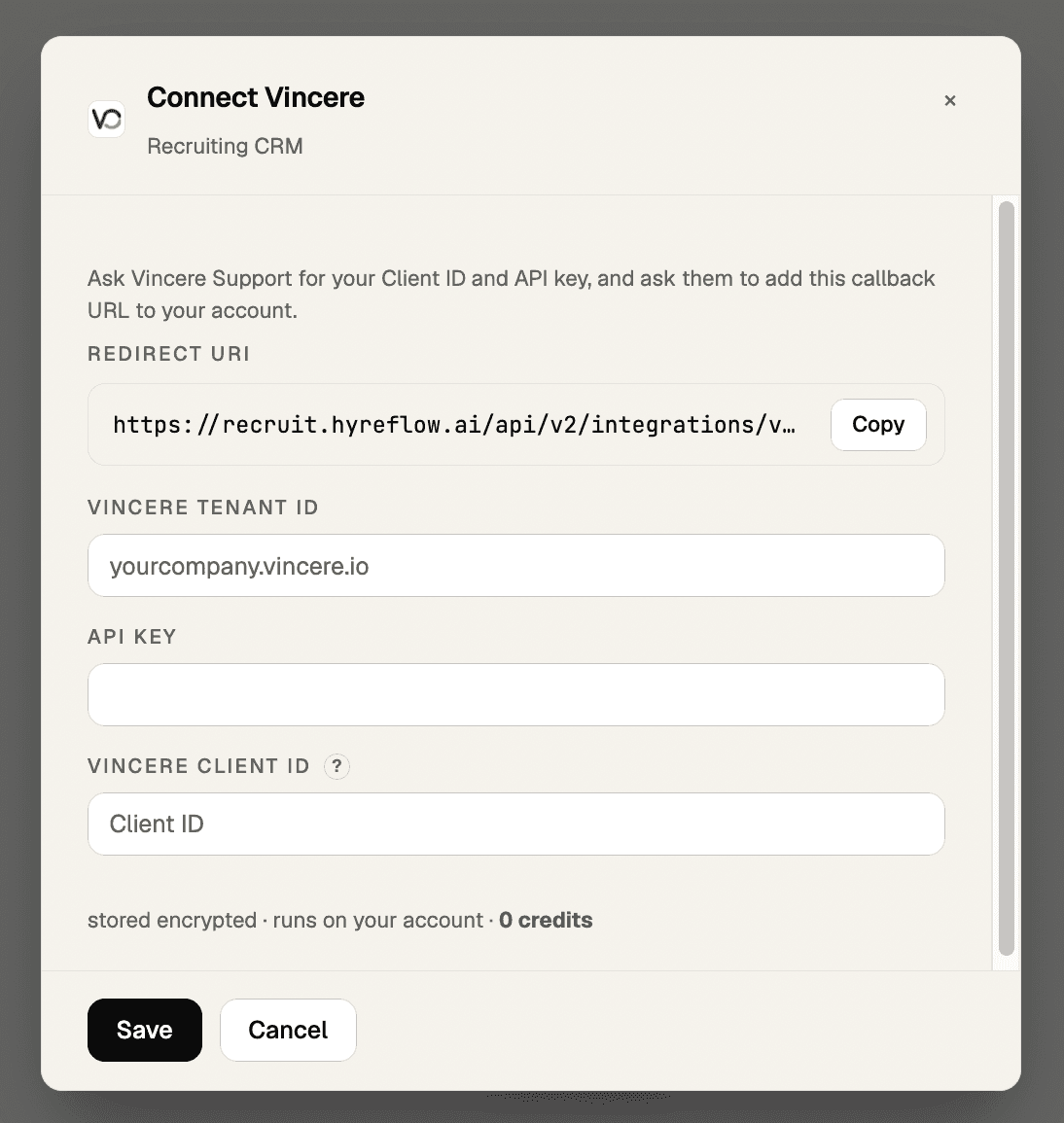
| Field in Hyreflow | What to enter | Example |
|---|---|---|
| Vincere Tenant Id | Your Vincere address, pasted as Vincere sent it. Just the first part works too. | yourcompany.vincere.io or yourcompany |
| API Key | The API Key line from Vincere's reply | f7e8d9c0-b1a2-… |
| Vincere Client ID | The Client Id line from Vincere's reply | a1b2c3d4-e5f6-… |
The Redirect URI at the top is the same address as in the message to Vincere Support. There's nothing to paste there yourself: Vincere Support adds it to your account. Use Copy if they ask for it again.
Click Save
Your details are stored encrypted. The API Key shows as dots from now on.There's no Client Secret field. That's expected: Vincere doesn't use one.
Connect to Vincere
Click Connect
A Vincere sign-in page opens.Sign in with your Vincere login
Use the account whose candidates, jobs and contacts Hyreflow should work with.Done
You're back on Integrations with a Vincere connected message and a prompt to copy into your coding agent.That's the whole setup. Hyreflow keeps the connection signed in and renews access by itself, so there's nothing to redo each day.
Try it
Start with something that only reads from Vincere, like asking Hyreflow to:
- "Find five candidates in Vincere with Python in their skills"
- "List our open jobs in Vincere"
- "Look up the contacts we have at Acme Ltd in Vincere"
If results come back, you're connected. Before your first big push, send one candidate and check it in Vincere: name, email and the other fields you care about should be where you expect. Then send the rest.
If something goes wrong
“Couldn’t connect” when you click Connect
The full message reads “Couldn't connect. Try again, and check your credentials and callback URL.” It's almost always one of two things:
- The Hyreflow Redirect URL isn't on your Vincere account yet. Check Vincere's reply for
https://recruit.hyreflow.ai/api/v2/integrations/vincere/oauth/callback. If it's missing, ask Vincere Support to add it. - The Client ID has a typo. Paste it again, click Save, then Connect.
Vincere refused access (403)
The API Key and Client ID don't belong together, or the Vincere login you connected with can't see those records. Ask Vincere Support to confirm the pair. If you changed the Client ID, enter its matching API Key as well. Hyreflow asks for it again when the Client ID changes.
The Tenant Id isn't accepted
Enter only your Vincere address, yourcompany.vincere.io or just yourcompany, with nothing after it.
A different website, or an address with extra parts like team.yourcompany.vincere.io, is refused.
It worked before, and now it says to reconnect
Vincere can end a connection, for example after a password or permission change. Open the Vincere card, click Connect and sign in again. Your saved details stay, so you don't need to re-enter them.
A big push is slow
Vincere allows 10 requests a second and 50,000 a day for each API Key, shared with every tool that uses the same key. Hyreflow paces itself well below that, so a large push takes a few minutes instead of failing halfway.
Still stuck? Contact support and tell us which step you're on.
What you can do once connected
Push candidates in
Send candidates Hyreflow sourced and enriched straight into Vincere, one or hundreds at a time.
Keep records up to date
Update existing candidates with new emails, phone numbers or job details.
Search your candidates
Check who's already in Vincere before sourcing, so you don't add duplicates.
Look up jobs, companies and contacts
Pull your open roles and client contacts into a search or an outreach plan.
Common questions
Do I need a developer?
No. Setup is one chat message to Vincere Support and a few clicks in Hyreflow.
Does the connection expire?
No. Hyreflow renews access by itself. You'd only sign in again if Vincere ends the connection, for example after a password change.
What can Hyreflow see in Vincere?
The same records as the Vincere login you connected with, nothing more. To limit what Hyreflow can reach, connect with a login that has narrower permissions.
We already connect Vincere to another tool. Is that a problem?
No. Ask Vincere Support to add the Hyreflow Redirect URL alongside the existing ones, as the message template says, and both keep working. They share the same request allowance, so very heavy use in one tool can slow the other.
How do I disconnect?
Open the Vincere card on Integrations and click Disconnect. Hyreflow deletes your saved details.
What does it cost?
Nothing on Hyreflow. Vincere reads and writes are 0 credits. You pay only for the sourcing and enrichment steps that find the candidates.
Reference
For people using Hyreflow from the command line or building their own workflows.
| Tool | Does | Cost |
|---|---|---|
vincere_search_candidates | Search candidates (q Lucene-style, fl = fields) | Free |
vincere_get_candidate | Fetch a candidate by id | Free |
vincere_create_candidate | Create a candidate | Free |
vincere_update_candidate | Update a candidate | Free |
vincere_search_jobs | Search jobs (job, not position, in v2) | Free |
vincere_search_companies | Search companies | Free |
vincere_search_contacts | Search contacts | Free |
hyreflow tools execute vincere create_candidate \
--payload '{"payload":{"first_name":"Ada","last_name":"Lovelace","email":"[email protected]"}}'- Jobs are
job, notpositionin v2. Search paths end in a slash (/candidate/search/). - Search fields:
flandsortare path parameters andqis a query parameter. Hyreflow sendsflandqfor you. - Bulk writes: use
create_candidates_batchfor large pushes. Hyreflow paces at 60 requests a minute, well under Vincere's limit. See Bulk pushes to ATS / recruiting CRM.
TrackerRMS
Recruiting ATS/CRM reads and writes via the v1 API. Candidates, jobs, companies, contacts, shortlists, longlists and activities.
Wiza
LinkedIn → email/phone enrichment that accepts Sales Navigator and Recruiter URLs. Key gotcha: reveals are async (start + poll); a phone reveal costs more than an email-only one.