

Aircall
Cloud phone system: pull call logs, transcripts & summaries into the ATS, log notes, click-to-dial and SMS. Free (comms, no data-reveal cost).
Use Aircall to sync recruiter calls, logs, recordings, transcripts and summaries, into the ATS, and to drive click-to-call and SMS from a workflow.
Free on hyreflow (0 credits), runs on your own Aircall account (comms, no data-reveal cost). Transcripts and summaries need Aircall's AI Assist add-on.
Connect your Aircall
Takes about two minutes. You need to be an admin on your Aircall account.
Open API Keys in Aircall
Go to dashboard.aircall.io/integrations/api-keys (in the Aircall dashboard: Integrations > API keys), then click Generate API key at the top right.
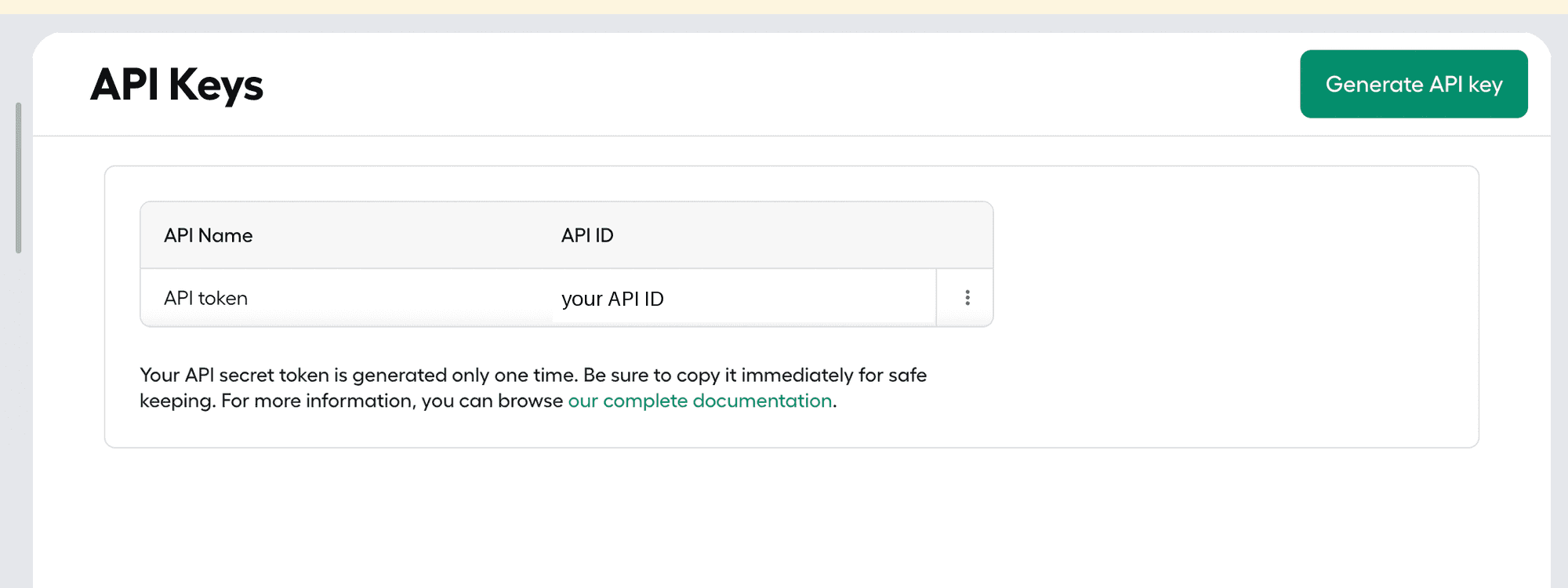
Name the key and copy both values
Name it hyreflow so you can spot it later. Aircall shows two values: copy the API ID and the API Token, then click Confirm.
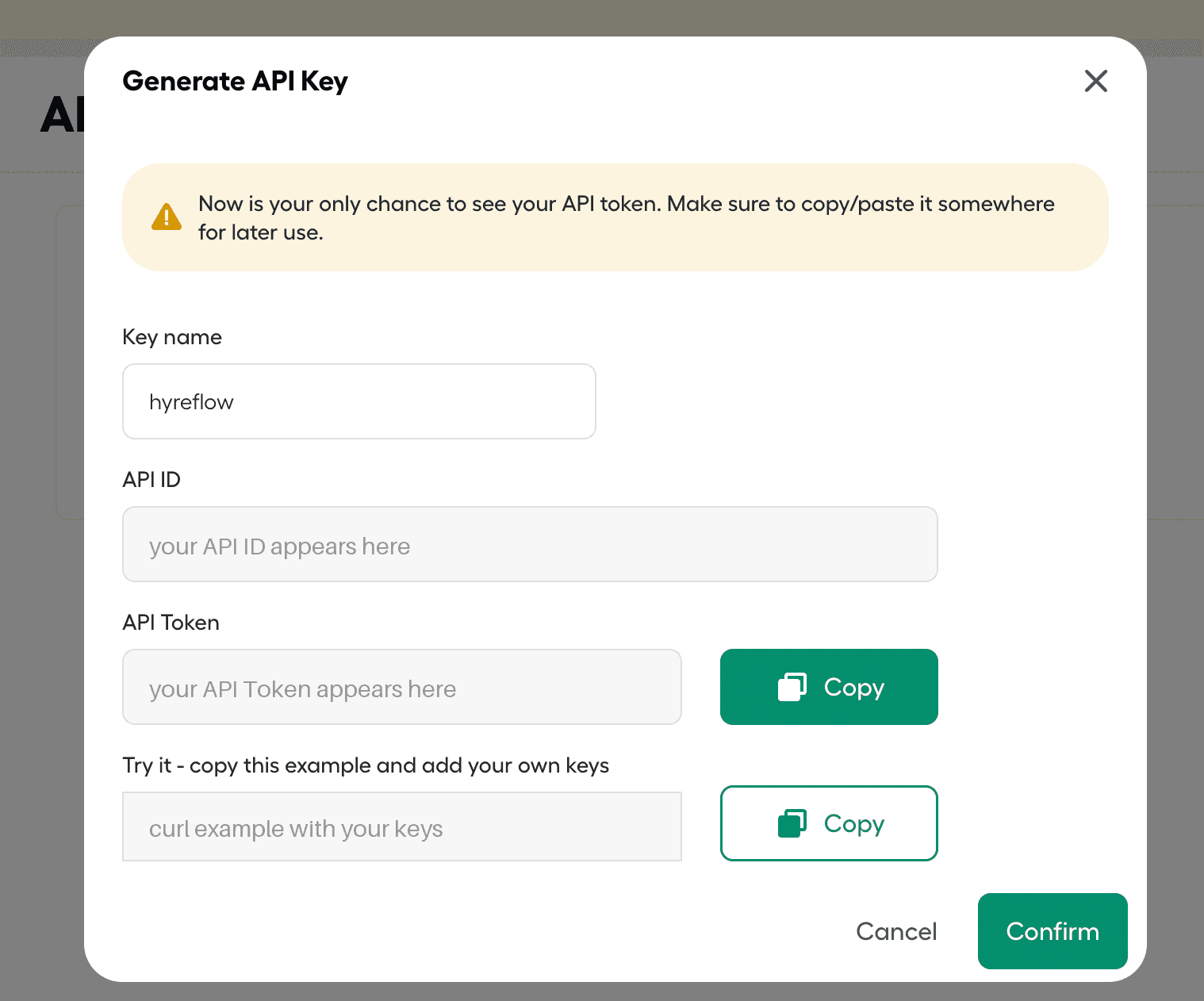
This is the only time Aircall shows the API Token. Paste it somewhere safe before you click Confirm. If you lose it, generate a new key.
Paste them into hyreflow
In hyreflow, open Integrations (recruit.hyreflow.ai/dashboard/integrations) and find the Aircall card under Telephony. Click Connect, paste the API ID and the API Token, then click Save and test.
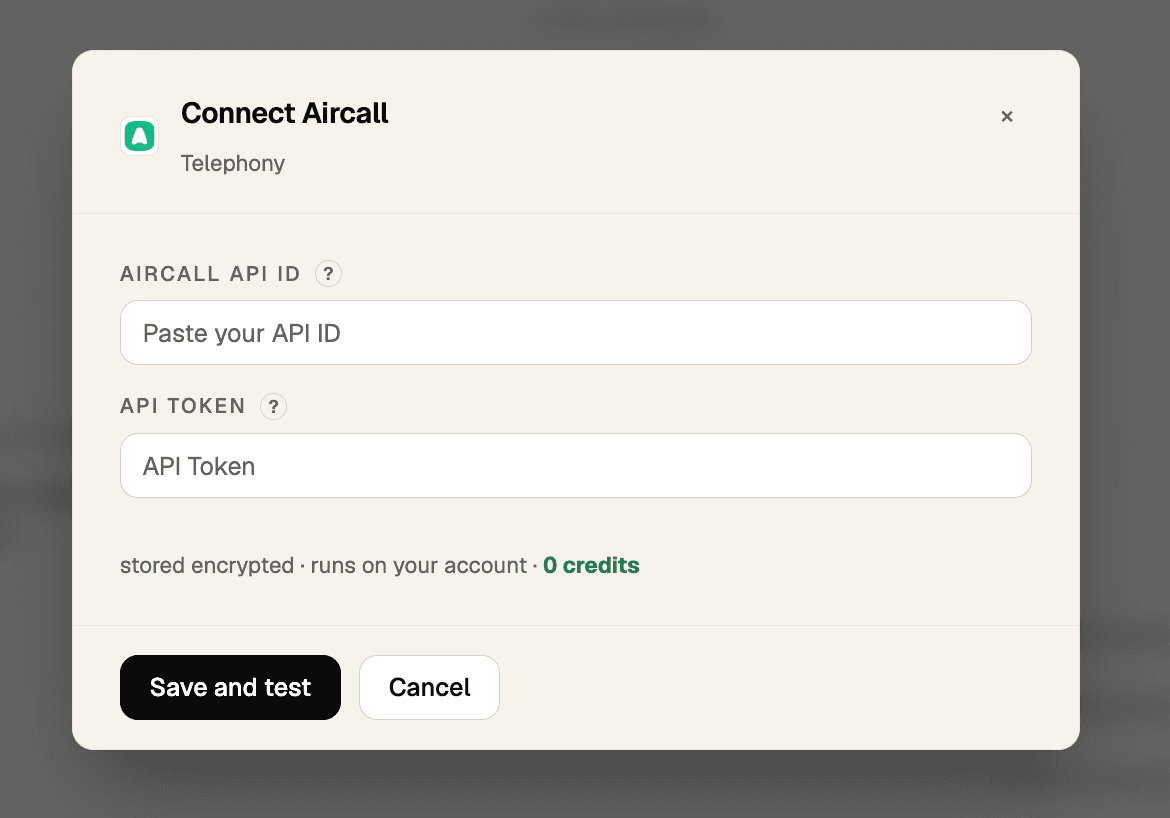
You're connected
hyreflow checks the key with Aircall straight away. When it connects, hyreflow shows a prompt to copy into your coding agent, and every Aircall tool runs on your own account.
If something goes wrong
- "Aircall rejected this API ID": the API ID and API Token don't match. Copy both again from the same key. If the token is gone, generate a new key.
- Transcripts or summaries come back empty: these need Aircall's AI Assist add-on on your Aircall plan.
- Texts (SMS) are refused with "company is not verified": Aircall only lets you send texts from the API after it has verified your company for SMS. Ask Aircall support to enable it.
- Click-to-call says "the user is currently unavailable": the Aircall user has to be signed in to the Aircall app for a number to land on their dialpad.
- To disconnect: on hyreflow's Integrations page, open the Aircall card's Manage menu and choose Disconnect (or Remove key), then delete it in Aircall (the ⋮ menu next to the key on the API Keys page) so it can't be used again.
Capabilities
| Tool | Does | Cost |
|---|---|---|
list_calls / iter_calls | Historical calls (auto-paginates; 6-month / 10k cap) | Free |
search_calls | Filter calls by number, user, tags, date | Free |
get_transcription | Conversation-intelligence transcript for a call | Free |
get_call_summary | AI summary for a call | Free |
comment_call / tag_call | Log a recruiter note / tag a call | Free |
search_contacts | Find a contact by phone or email | Free |
dial | Push a number to a user's phone (click-to-call) | Free |
send_message | Send an SMS from a registered number | Free |
Guidance
- Read source: pull
list_calls+get_transcription/get_call_summary, then write them as candidate activity into the ATS. - Write target:
comment_callto log recruiter notes;dialfor click-to-call. - Pagination caps: calls and contacts max out at 10,000 items and 6 months of history;
iter_calls/iter_contactsauto-walkmeta.next_page_link. - Rate limit 120 req/min/company: watch the
X-AircallApi-Remainingheader. dial,send_message,tag_call,comment_callwrite to a live phone system: pilot one before any bulk run.
hyreflow tools execute aircall search_calls \
  --payload '{"phone_number":"+14155550123","per_page":10}'
Phone numbers and emails on contacts are lists of {label, value} objects, shape create_contact/update_contact payloads accordingly.
AiArk
B2B people & company search plus work-email/mobile enrichment, the only DB with an OPEN_TO_WORK filter; work-email-only, async email/export flows.
Apify
Run web-automation/scraping actors from the Apify store, discover a vetted actor, inspect its schema, run it synchronously. BYOK-only on hyreflow.