Carerix
Recruiting ATS/CRM reads and writes via the GraphQL API. Candidates, vacancies, companies, contacts, matches and notes.
Use Carerix as the ATS/CRM write target at the end of a recruiting pipeline: push enriched candidates in, and read vacancies, companies, contacts and matches back out.
Free on hyreflow (0 credits): runs on your own Carerix connection. You pay only for the upstream sourcing/enrichment.
Connect your Carerix
Takes about five minutes. You need to be able to manage clients in Carerix (Maintenance > Identity Access).
Create a confidential client in Carerix
In Carerix, open Maintenance > Identity Access > Clients and add a new confidential client. Name it hyreflow so you can spot it later, make sure it is Active, and give it the default scope urn:cx/cx5Wrapper:data:manage.
Set what the client may read and write
On the client's Permissions, grant read access to candidates (employees), and read/write on the records you want hyreflow to change: candidates, matches and notes, plus read on vacancies, companies and contacts. Hyreflow can only do what this client is allowed to do.
Copy the Client ID, secret and your Carerix URL
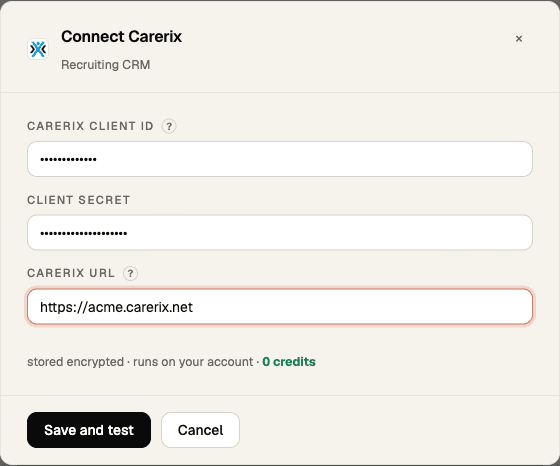
Copy the client's Client ID and Client Secret, and the address you log in to Carerix at, for example https://acme.carerix.net. hyreflow reads your tenant (acme) from it; the bare name works too.
Paste them into hyreflow
In hyreflow, open Integrations (recruit.hyreflow.ai/dashboard/integrations) and find the Carerix card under Recruiting CRM. Click Connect, paste the Client ID, Client Secret and Carerix URL, then click Save and test. You can also run hyreflow byok set carerix.
You're connected
hyreflow requests a token from Carerix straight away and refreshes it automatically. When the card says connected, every Carerix tool runs on your own client.
If something goes wrong
- "Carerix rejected this Client ID" … tenant not found: the Carerix URL is not your own login address (copy it from the browser when you are signed in to Carerix), or your tenant signs in on a Carerix login host other than
id.carerix.io, which is not supported yet. - "Carerix rejected this Client ID" … invalid_client: the Client ID and secret don't match, or the client is not active. Copy both again from the same client.
- "Carerix rejected this Client ID" … invalid_scope: the client does not have the
urn:cx/cx5Wrapper:data:managescope. - A tool fails with a 403: the client is missing a permission for that record type. Add it on the client's Permissions in Carerix, then click Save and test again.
- To disconnect: on hyreflow's Integrations page, open the Carerix card's Manage menu and choose Disconnect (or Remove key), then deactivate or delete the
hyreflowclient in Carerix so its secret can't be used again.
Capabilities
| Tool | Does | Cost |
|---|---|---|
ping | Verify the credentials and tenant (safe read-only pilot) | Free |
list_candidates | One page of candidates, oldest first, optionally filtered by a qualifier | Free |
search_candidates | Candidates matching a qualifier such as emailAddress = '[email protected]' | Free |
get_candidate | Fetch a candidate by id | Free |
create_candidate | Create a candidate, with Carerix duplicate detection on by default | Free |
list_vacancies | One page of vacancies, oldest first | Free |
get_vacancy | Fetch a vacancy by id | Free |
list_companies | One page of client companies | Free |
get_company | Fetch a company by id | Free |
list_contacts | One page of client contacts | Free |
get_contact | Fetch a contact by id | Free |
list_matches | One page of matches, the candidate-to-vacancy links that carry the pipeline status | Free |
get_match | Fetch a match by id | Free |
update_match | Update a match, for example its notes or pipeline status | Free |
list_notes | One page of notes | Free |
get_note | Fetch a note by id | Free |
create_note | Add a note to a candidate, vacancy, match, company or contact (pass your tenant's note type as toDoTypeKey) | Free |
Guidance
- Filters are Carerix qualifier strings:
list_*andsearch_candidatestake aqualifier. Each call returns one page:pagestarts at 0 andpage_sizeis at most 100 (a larger value is rejected, not clamped). Keep raisingpageuntil a page comes back short. - Record ids are strings.
- A GraphQL error returned with an HTTP 200, or a missing result, is surfaced as an error, not as an empty result.
- No delete operation is exposed for any record: pushes and edits only.
- Never blind-retry a create or update: a lost response may already have applied the write. Reads retry on rate limits and server errors; writes are never retried after a timeout or server error, only after a rate limit or an authentication refusal (HTTP 401, or GraphQL
UNAUTHENTICATEDon the top-level field), which Carerix rejects before running them. - Status ids are tenant-specific, so read a match first and reuse the status id it carries before moving one.
- Pilot one record first: required fields and the duplicate-detection key vary by tenant setup, so create a single candidate and check it in Carerix before a bulk push.
hyreflow tools execute carerix create_candidate \
  --payload '{"payload":{"firstName":"Ada","lastName":"Lovelace","emailAddress":"[email protected]"}}'
Enriched candidates land here at the end of the pipeline: source → enrich → verify → create_candidate.
Rate limits & bulk writes
Carerix allows 10 requests/second per client, which is 600 requests/minute. The adapter paces to that number per client and tenant rather than guessing a conservative default. Use create_candidates_batch for large pushes.
See Bulk pushes to ATS / recruiting CRM.