

How to build a Grokbot recruiting army with hyreflow
Set up 7 Grok Bot recruiting agents wired to hyreflow that find hiring signals, find the hiring manager and draft your outreach. One prompt, about 35 minutes.
 Frederik Huetzenhyreflow
- Guide
- 12 min read
- Published
On this page
- What does the Grokbot recruiting army do?
- What do the words in this guide mean?
- What do you need before you start?
- Where do you get the 7 skill files?
- Step 1: Build your second brain (5 minutes)
- Step 2: Create your first bot and paste the prompt (2 minutes)
- Step 3: Approve the team and answer the setup questions (8 minutes)
- Step 4: Run one test signal (3 minutes)
- What does the army do every day?
- How do you give a bot a job on demand?
- How do you change your setup later?
- Where does the Grokbot recruiting army fall short?
Steal my Grokbot recruiting army. It is 7 Grok Bot agents that find hiring signals, find the hiring manager and draft your outreach, all working through hyreflow. You paste one prompt, answer a few questions, and the team runs while you do something else.
- Steps
- 4, from sign-up to first real signal
- Bots
- 7, one job each
- Prompts
- 1, builds the whole team
- Setup time
- About 35 minutes
What does the Grokbot recruiting army do?#
The army is a recruiting team of AI agents that works while you don't. It connects to hyreflow the same way Claude and ChatGPT do, through the hyreflow MCP server. Grok Bot runs the team, upstairs. hyreflow does the work underneath, downstairs: your second brain, live job and company data, contact enrichment, and your CRM and sequencer.
| Bot | What it does | Hands to |
|---|---|---|
| Army Setup | Builds the team, connects hyreflow, runs the setup questions | Everyone |
| Market Mapping | Maps your desk: who hires, where the talent sits, a watchlist | Signal Bot |
| Signal | Finds companies with buying signals: new roles, reposts, funding, growth | Hiring Manager Bot |
| Hiring Manager | Finds and verifies the decision-maker behind each signal | Outreach Bot |
| Shortlist | Turns a job ad into a ranked shortlist and an anonymised teaser | Outreach Bot |
| Screening | Scores CVs against the role and preps the screening call | You |
| Outreach | Drafts a 3-step sequence per contact. Never sends without your OK | You |
What do the words in this guide mean?#
No tech background is needed. These are the only terms that come up, in plain words.
| Term | What it means |
|---|---|
| Grok Bot | An app from xAI where you create AI assistants ("bots") that work for you. Each bot has a name, a job and its own computer in the cloud, so it keeps working when your laptop is closed. |
| Bot | One AI assistant inside Grok Bot with one job, like "find hiring signals". Your army is 7 bots. |
| Primary bot | The first bot you create. It manages the others. In this guide it is your Army Setup bot. |
| hyreflow | The recruiting platform underneath. It finds job ads and companies, finds and verifies contacts, and connects to your CRM and email tools. |
| Second brain | Notes about your agency that hyreflow writes by reading your website: who you place, your clients, their pains, your pitch. Every bot reads it first. |
| Connector | The link that lets Grok Bot use hyreflow. You add it once and sign in once. |
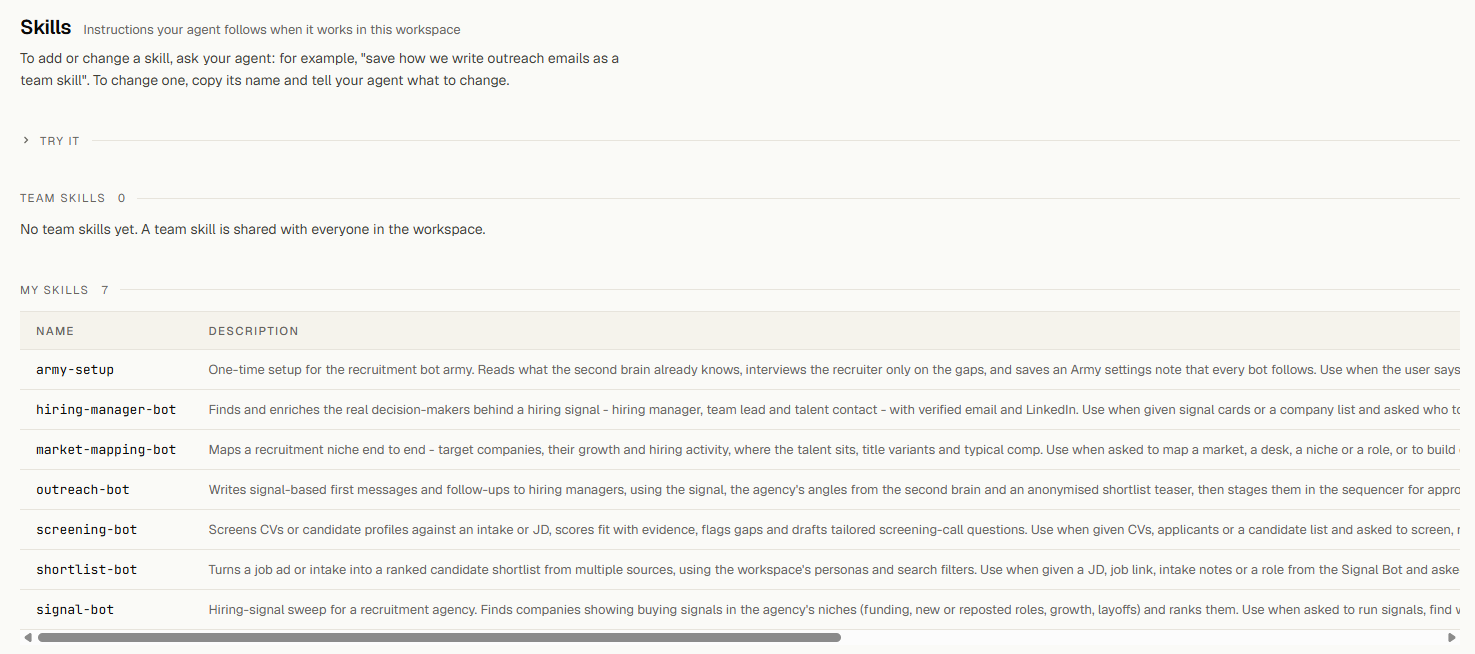
| Skill | A written instruction manual for one bot, stored in your hyreflow account. You get 7 skills with this guide. |
| War room | A group chat in Grok Bot with your 6 working bots and you. The bots pass work to each other there. |
| Army settings | Your answers to the setup questions, saved in hyreflow: your market, which signals count, who to contact, your credit cap. |
| Credits | How hyreflow charges for searches and lookups. Each bot shows what it spent. |
| Routine | A job a bot does on its own on a schedule, like "every weekday at 08:00". |
What do you need before you start?#
You need four things. Grok Bot and hyreflow credits cost money; signing up for hyreflow is free.
| What | Good to know |
|---|---|
| A hyreflow account | Sign up at hyreflow.ai with your work email. The second brain is built from the website your email points to. Signed up with a personal email such as Gmail? hyreflow asks you for your company website instead. |
| Grok Bot | Comes with a paid X subscription. Check the current plans at x.ai/bot.1 |
| hyreflow credits | What a run costs depends on how much it searches. Every bot shows what it spent, and your Army settings hold a credit cap the bots are told to stay within. For a limit hyreflow itself enforces, set a spending cap on the billing page. Plans are on the pricing page. |
| The army prompt and 7 skill files | The prompt is in Step 2. Download the 7 skill files (.zip) and unzip them before you start. |
Where do you get the 7 skill files?#
Each bot gets its job from one skill file, so download them before Step 2, where you attach all 7 to the first message. Download the 7 skill files (.zip) and unzip them. Once saved, each skill lives in your hyreflow workspace, so the same bots also work from Claude or ChatGPT if you connect hyreflow there. The same idea in another assistant is in How to use Microsoft Copilot for recruiting.
| Skill | What it does |
|---|---|
| army-setup | Reads your second brain, asks up to 8 questions, saves your Army settings |
| market-mapping-bot | Builds a market map with Hot, Warm and Talent-pool companies plus a watchlist |
| signal-bot | Runs only the signals you switched on, scores them with your weights, posts signal cards |
| hiring-manager-bot | Finds and verifies 2 to 3 decision-makers per company, flags anyone already in your CRM |
| shortlist-bot | Turns a job ad into a ranked shortlist and an anonymised teaser |
| screening-bot | Scores CVs on must-haves and weighted criteria, drafts screening questions |
| outreach-bot | Writes a 3-step sequence per contact and stages it only after your approval |
Step 1: Build your second brain (5 minutes)#
First, hyreflow learns about your agency, so your bots know who you are without you explaining it.
Start the build
- Go to hyreflow.ai and sign up with your work email, or log in.
- In the menu on the left, click Knowledge.
- If the page says No notes yet, click Build my second brain. A new workspace often starts the build by itself when you finish the first setup step, so it may already be running. If you already own a second brain in another workspace, there is no button: hyreflow fills this one as you work.
- hyreflow now reads your website and public information about your agency. Wait 3 to 4 minutes; you can leave the page and come back.
- When it is done, a map of dots and lines appears. Each dot is one note.
Click Build my second brain, wait, and the notes appear. The wait is sped up. Check what it learned
- On the left your notes sit in folders: Angles (your pitch), Candidate personas (who you place), Company, Pains (client struggles), Proof, Search filters and Triggers (signals that a company needs you).
- Click any note. A panel opens on the right with what it says.
- Scroll down: Linked from shows related notes, Sources the pages it came from.
- Something looks wrong? In Step 3 the bot asks you a few questions, and your answers there take priority over these notes.
Opening a persona, its sources, then its search filter.
Step 2: Create your first bot and paste the prompt (2 minutes)#
Now you switch to Grok Bot. You create one bot and give it one long message, and that message tells it to build the whole team for you.
- Open the Grok Bot app and log in.
- A box says Introducing your primary Bot. Click Create primary Bot. If you already have bots, click + at the top of the sidebar.
- Your new bot says hello. Wait until it stops typing.
- Click the message box, click + on its left and attach the 7 skill files from the skills zip.
- Copy the prompt below, paste it in and send it.
You are my Army Setup bot. Build my recruiting army with hyreflow, step by step. Ask me before you create anything new, and stop and wait whenever a step needs me. STEP 1: Connect hyreflow - Add a custom connector called "hyreflow" with the URL https://recruit.hyreflow.ai/api/v2/mcp - Show me the sign-in card and wait until I have signed in and approved my workspace. - Then call hyreflow_knowledge_index and tell me in one line what my second brain contains. STEP 2: Install the skills - Call hyreflow_custom_skills_list. I need these 7 skills: army-setup, market-mapping-bot, signal-bot, hiring-manager-bot, shortlist-bot, screening-bot, outreach-bot. - For any that are missing, save the matching file I attached as a personal hyreflow custom skill with hyreflow_custom_skill_save. STEP 3: Create the team Propose these 6 bots in one list and create them after my single "yes". Give each the name, title and instruction below: 1. Market Mapping Bot. Title: Market Analyst. Instruction: "Run the hyreflow custom skill market-mapping-bot. Post the watchlist in the War room for the Signal Bot." 2. Signal Bot. Title: Signal Scout. Instruction: "Run the hyreflow custom skill signal-bot. Post your SIGNAL CARDs in the War room for the Hiring Manager Bot." 3. Hiring Manager Bot. Title: Contact Researcher. Instruction: "Run the hyreflow custom skill hiring-manager-bot on new SIGNAL CARDs. Post CONTACT CARDs in the War room for the Outreach Bot." 4. Shortlist Bot. Title: Sourcer. Instruction: "Run the hyreflow custom skill shortlist-bot. Post the anonymised TEASER in the War room for the Outreach Bot." 5. Screening Bot. Title: Screener. Instruction: "Run the hyreflow custom skill screening-bot when CVs or applicants come in." 6. Outreach Bot. Title: BD Writer. Instruction: "Run the hyreflow custom skill outreach-bot on CONTACT CARDs and TEASERs. Stage drafts only. Never send without my approval." Then make sure every bot can use hyreflow. Ask each one to call hyreflow_custom_skills_list. If a bot can't, add the hyreflow connector for it the same way as in Step 1 and wait for me to sign in. STEP 4: Wire it up - Create a channel called "War room" with the 6 bots and me in it. Bots hand work to each other there. - Routines: the Signal Bot runs every weekday at 08:00 my time; the Market Mapping Bot runs on the first Monday of each month. Every other bot works when it gets a handoff. - Add these rules for all bots: "Never send messages, activate campaigns or push to my CRM or sequencer without my explicit approval in chat. Stay within the credit cap in my Army settings." STEP 5: Configure Run the hyreflow custom skill army-setup with me now. Ask the questions one at a time and use what the second brain already knows. When you are done, give me a short summary: the bots you created, what each one does, the routines, and the first thing I should ask.
What comes back
The bot works through five things in order: it connects hyreflow, checks the 7 skills are installed and saves any that are missing, creates the 6 working bots, sets up the War room and the schedules, and asks you the setup questions. It stops and waits whenever it needs a click from you.
Step 3: Approve the team and answer the setup questions (8 minutes)#
From here the bot does the building. You only step in when it asks, which happens five times.
Let it add hyreflow
- The bot checks Grok's list of ready-made connections and does not find hyreflow there.
- It asks whether to add hyreflow as a custom connector. Click Yes, add hyreflow.
- A hyreflow card appears in the chat with an Authorize button.
The bot asks to add hyreflow. Click Yes, add hyreflow. Sign in to hyreflow, once
- Click Authorize on the hyreflow card.
- A box opens: Connect to hyreflow. You sign in securely, Grok Bot never sees your password, and you can remove the connection any time. Click Continue.
- Your browser opens the hyreflow sign-in. Log in if asked and approve your workspace.
- Back in Grok Bot the card says Connected · 1 Account, and the bot carries on by itself.
The Connect to hyreflow box, then Continue. Every bot created afterwards uses this sign-in. Approve the team
- The bot tells you in one line what your second brain contains, for example how many personas, pains and triggers it found.
- It checks the 7 skills are in your hyreflow account and saves any that are missing.
- It lists the 6 bots it wants to create. Read the list, then click Yes, create all 6.
The proposed team and the question to create all 6. - Within seconds the 6 new bots appear in the sidebar.
- It may ask who should sit out of the War room, because a group chat holds at most 6 bots. Choose Leave me (Army Setup) out. The Army Setup bot stays your manager, the one you go to when you want to change something.
- It creates the War room and two schedules, which show in the right panel under Routines.
Your army appears in the sidebar. Answer the setup questions
The bot asks up to 8 questions, one at a time. Each comes with a suggested answer you can click, or you type your own. Questions your second brain already answers come as a quick yes or no.
The questions, then the saved settings. # The bot asks 1 Which roles, regions and company sizes should the bots target? 2 Which signals mean "this company needs us"? Funding, new roles, reposted roles, headcount growth, layoffs 3 Which of those signals should rank highest? 4 Which companies should never be contacted, for example your current clients? 5 Who should the bots find at each company: hiring manager, one level up, talent acquisition, founder? 6 Which CRM and which email or LinkedIn tool do you use? 7 How many credits may one run use, and may bots run on a schedule? 8 How should outreach sound, and which facts may it use? Save your settings
- The bot shows a short summary in plain words, for example "your bots will look for new and reposted roles, not funding".
- Click Yes, save them.
- It saves your Army settings in hyreflow and ends with a summary: the bots, what each does, the schedules and the first thing to try.
Step 4: Run one test signal (3 minutes)#
Watch the army handle one real example from start to finish. The bots pass work to each other without you copying anything.
- In the sidebar, click War room.
- Copy the message below, change SDR desk to the roles you recruit for, and send it.
Test run: we're testing the handoffs with a single real example. Signal Bot: find 1 signal for my SDR desk (one company is enough) and post its SIGNAL CARD here. Hiring Manager Bot: find the hiring manager for that one company only (1 contact), then post the CONTACT CARD. Outreach Bot: write the 3-step sequence for that contact as a draft for my review. Do not send or stage anything. Keep the whole test under 30 credits and show what each step cost.
What comes back
A signal card from the Signal Bot, a contact card from the Hiring Manager Bot and a 3-step draft from the Outreach Bot, each with what its step cost.
The Signal Bot searches live job ads and posts a signal card: company, role, date, a link to the ad, and why they need a recruiter now. It ends by mentioning the Hiring Manager Bot, and that mention is the handoff.
The Hiring Manager Bot finds the right person. In our run there was no Head of Sales, so it chose the co-founder, as the settings allow at small companies. The Outreach Bot then writes a short email, a LinkedIn note and a follow-up as a draft, and sends nothing.
What does the army do every day?#
The army runs and you approve, which takes about 10 minutes a day.
- Every weekday at 08:00 the Signal Bot sweeps, and the chain runs on its own to drafts.
- You open the Outreach Bot, approve the good drafts and skip the rest. The bots are told to wait for that before anything goes out.
- A client sends a role: drop the job ad into the Shortlist Bot. Its anonymised teaser goes to the Outreach Bot as proof.
- CVs come in: hand them to the Screening Bot for a verdict and call prep.
- First Monday of the month: the Market Mapping Bot refreshes your map.
How do you give a bot a job on demand?#
Write to it in normal words and it starts right away; the schedules are optional. Click one bot in the sidebar for a single job, or post in the War room and name the bots in order for a chain of jobs.
| Write to | Example message |
|---|---|
| Market Mapping Bot | Map senior data engineers in DACH fintech, companies with 50 to 500 staff. |
| Signal Bot | Run signals now for my SDR desk, only the last 3 days. |
| Hiring Manager Bot | Find the hiring manager for the Head of Finance role at Acme. |
| Shortlist Bot | Here is a job ad: [paste the text or link]. Build me a shortlist. |
| Screening Bot | (attach the CVs) Screen these against the Sales Associate role and prep my calls. |
| Outreach Bot | Rewrite the draft for [contact] in German and make it shorter. |
| War room | Signal Bot: find 3 companies hiring account executives in Berlin. Hiring Manager Bot: find the decision-maker at each. Outreach Bot: draft a sequence for each, for my review. |
Be as specific as with a junior colleague, and add a limit when unsure, like "keep it under 50 credits". To pause a schedule, switch the routine off in the bot's Routines panel, or write "pause your daily sweep".
How do you change your setup later?#
Ask a bot; you never edit a file.
- To change your settings (market, signals, no-go list, contacts, credit cap, voice), open your Army Setup bot and write "Update my army settings", or say what changes, like "add acme.com to the no-go list". It shows the current settings, then the result, and saves after your yes.
- To change how a bot works, open any bot connected to hyreflow and write, for example, "Open my hyreflow skill outreach-bot and change it: emails under 70 words. Save it as a new version." Earlier versions are kept.
- To share a skill with your team, ask to "save it as a team skill". Personal skills are live at once; team skills wait for the workspace owner's approval on the Skills page.
| If | Then |
|---|---|
| A bot says it cannot see hyreflow | Ask it to add the hyreflow connector, then authorize once more |
| No second brain was built | Signed up with a personal email such as Gmail? Open Knowledge and give hyreflow your company website to read |
| A bot asks for your ICP | Your second brain is empty or still building. Wait, or run the setup questions again |
| A run stops early | It hit the credit cap in your Army settings or the spending cap on your billing page. Raise the cap or run a smaller job |
| You want a new War room | Ask the Army Setup bot to create one with the same 6 bots |
Build your second brain first
Step 1 takes 5 minutes and runs on its own. New hyreflow workspaces start with free credits, and every bot shows what it spent.
Where does the Grokbot recruiting army fall short?#
Footnotes#
-
Grok Bot plans and prices, xAI. ↩
Sources
- Grok Bot, xAI
- About X Premium, X Help Center
- Model Context Protocol, introduction, modelcontextprotocol.io
Frederik Huetzen
hyreflowFrederik works on hyreflow and writes about what the product does in real recruiting workflows.